-1200x900.jpg)
Laptops are very different, and it’s not just “some are thinner, others are thicker.” Some models are designed for studying and working in the browser, others for 3D graphics, heavy programs or games. Almost everything depends on the type of laptop: how long it holds a charge, whether it is comfortable to carry, how quickly your project opens, and even whether the case will get warm when you are just working in Word.
In order not to overpay “just in case” and not to be disappointed because of little things, you should first understand what exactly you will do with it. Because there is no option for everything. There is one that will suit your needs.
Therefore, in this article we will figure out what types of laptops there are according to purpose and shape, and how to quickly figure out what is right for you.
Types of laptops by purpose
There are actually a lot of them. And it's not just about brands. Even within one manufacturer there are dozens of configurations - with different processors, screens, memory, video cards. But this is for a reason, and definitely not so that you pay more. Manufacturers know well that everyone buys a PC for themselves. Some will study, some will work with graphics, some will program or go on business trips. And creating one model for all cases is simply unrealistic.
Therefore, laptops differ in filling. Somewhere the emphasis is on autonomy and weight, somewhere on power, somewhere on the display or cooling. This is done for different loads.
Laptops for studying

If you need a laptop for school, that means it will have documents, a browser, Zoom, and a little something extra. For example, presentations, simple programs, or working in Google Drive. And the main thing here is not maximum power, but that it is reliable, light and does not sit in the middle of the pair.
Therefore, they most often contain:
- RAM – at least 8 GB. There are 4 GB ones, but then you quickly feel slow, even in a browser with several tabs.
- Processor – Intel i3 / Ryzen 3 or newer. The basic power is quite enough for studying, even remotely.
- Autonomy – from 6 hours. Otherwise you will have to constantly look for an outlet.
- Weight – up to 1.6-1.8 kg. Because if you wear it every day, it is important not to strain your back.
- Screen – IPS, from 14 inches. Not too small, not too bulky.
- Storage – SSD, 256 GB or more. HDD is slow and not for studying in 2026.
- Not everyone has a backlit keyboard, but they do. This is convenient for students who are used to studying in the evening.
It is quite possible to buy such “workhorses” at an affordable price. There are several time-tested options on the market that fit perfectly into these parameters:
- Lenovo IdeaPad Slim 3 is the most popular choice. A simple plastic body, but a very durable filling.
- Acer Aspire Go 15 – new for 2025. This is the simplest possible laptop, which is “tailored” for the browser and Zoom. Its main advantage is its low price with a good screen.
- ASUS Vivobook Go 15 is lighter and thinner than the regular Vivobook, and often has very bright screens for the money.
Learn more about choosing a laptop for students ← read our full article.
Laptops for work
But with work everything is a little different. Everyone has their own. One accountant wipes his numpad until it shines and works with spreadsheets from morning to evening. The other is a freelancer who codes in a cafe. Some prepare presentations, some correspond with clients, and some process orders in CRM.
But if you average out the main tasks, then you usually buy a work laptop with:
- Processor – something like i5 or Ryzen 5. So that everything works stably, without freezes.
- RAM – 16 GB. So that you can keep your browser, documents, Zoom and something else open in parallel.
- SSD – at least 512 GB. Because over time there are a lot of files.
- Display – from 15 inches, IPS. To make it convenient to work with text, tables or graphics.
- Ports – HDMI or USB-C with video output. Otherwise, there will be trouble connecting a monitor or projector.
- The keyboard is comfortable, backlit. If you type often, you can feel it.
- Security – fingerprint scanner, TPM chip, lock slot. This is standard in the business series.
- The case is durable. After all, a laptop must withstand travel, a bag, an office, and they use them every day, without exaggeration.
This is a versatile option that suits most, whether you work in an office or at home. If you're looking for a reliable tool without overpaying for design or branding, check out these models:
- HP 250 / 255 G10 are purely corporate budget lines. They don't have a design, they look like gray bricks, but they are very durable and have a convenient number pad (keys on the right) for working with numbers.
- Dell Inspiron 3530 is the simplest model from Dell. It is as reliable as an automatic machine and has excellent service support.
- Acer Extensa 15 is a direct competitor to the HP 255. A work machine without unnecessary pretentiousness that simply works 24/7.

Laptops for programming
With programming it's still more specific. Here the laptop is constantly under load. Compilation, development environments, browser with documentation, terminal and everything works at the same time. And if you choose the weak one, it feels very fast, especially when working in VS Code, PyCharm or Visual Studio for several hours at a time.
Therefore, most often they take models where:
- Processor – i5, Ryzen 5 or something more powerful. So that it doesn’t slow down when starting a project or compilation.
- RAM – from 16 GB. Otherwise it starts to hang, especially with Docker or heavy IDEs.
- Screen – IPS, 15.6 inches or larger. More space for code, less strain on your eyes.
- The display coating is matte. Convenient to work during the day, without glare.
- System – Windows with WSL, Linux or macOS. The main thing is that there are no problems with drivers and updates.
- Ports – USB-C or HDMI to connect a monitor or docking station.
- The keyboard is backlit. It is more convenient to work in the evening.
- The assembly is reliable. Because the laptop is at work every day, and often on the road.
Such models cost more than budget ones. But the tasks here are more complicated - everything works simultaneously in several windows, and everything should fly, not slow down.
To start in IT (budget ~350-650€) it is worth considering:
- Lenovo IdeaPad Slim 5 (Ryzen 5 / 16 GB) is the minimum comfortable level. Unlike the smaller 3 Series, there is often a metal lid and better cooling, which is important during long coding sessions.
- Xiaomi RedmiBook 15 is popular among beginners because of its excellent display and powerful hardware for less money. A perfect choice for users who want maximum performance at a minimal cost.
If your budget allows you to rise to 700-900 €, you get devices with better screens and more powerful “H” or “HS” series processors:
- ASUS Vivobook S 15 OLED is a real hit in this price segment. Its 120Hz OLED screen makes code extremely clear, and powerful Intel Core Ultra or Ryzen 7 processors make compilation lags a thing of the past.
- Lenovo ThinkBook 16 G6 / G7 is the “little brother” of the legendary ThinkPad. It has a clean design, an excellent selection of ports, and extensive upgrade options (you can often add more RAM in the future). A very reliable machine for daily development.
- Acer Swift Go 14 is an ideal choice for those who code on the go or in coffee shops. Weighing just 1.3 kg, it features a top-of-the-line display and a processor that can easily handle the loads of local servers or virtual machines.
- HP Victus 16 (configurations with Ryzen 7 / Core i7) - although it is considered gaming, programmers often choose it for its powerful cooling system. If you are planning to do GameDev or Data Science where you need a discrete graphics card, this is the best entry ticket into a professional job.
Laptops for video design and editing
It's not just speed that's important here, but color accuracy, stability under load, and the ability to render without hours of waiting. Such tasks require a completely different level of hardware.
Therefore, they are looking for a workstation in which:
- Video card (GPU) – discrete, not integrated. NVIDIA RTX or something similar. Without it, rendering a video or 3D scene will take forever.
- Screen – IPS or OLED, with 100% sRGB coverage, better than DCI-P3. For accurate colors without surprises.
- Fast SSD – from 1 TB. Video files are large, projects weigh tens of gigabytes.
- Cooling is powerful, preferably with two fans. Otherwise there will be noise, overheating and throttling.
- Ports – Thunderbolt, USB-C with video output, card reader. Conveniently connect an external monitor, tablet or hard drive.
These laptops are seriously loaded. But the tasks here are also relevant - when every second of rendering or color accuracy matters.
Depending on your budget, you may consider the following options:
Budget start (~ 550–870 €) – for beginners in Photoshop, Illustrator or easy editing for YouTube/TikTok there are models:
- Lenovo IdeaPad Pro 5 (with 2.5K or 3K screen). Its main trump card is the display. It is much better than regular office models and has correct color rendition right out of the box.
- Gigabyte G5/G6. The most affordable way to get a powerful RTX 40 series graphics card. Its design is simple, but for video rendering in Premiere Pro you can't find a better one for the money.
Golden mean (~ 900–1400 €) – for professional work with 4K video, 3D modeling and large projects. Please note:
- ASUS Vivobook Pro 16X OLED - an incredible OLED display and a built-in virtual wheel (DialPad) for convenient work in Adobe software. This is a laptop designed specifically for artists and editors.
- MacBook Air 13 or 15 (M3 chip with 16 GB RAM) - if you need mobility. It runs silently and produces stable speeds in Final Cut or DaVinci, even on battery power.
- HP Envy 16 – stylish aluminum body, powerful hardware and, most importantly, very high-quality screen calibration.
Professional stations (from 2000 €) – when every second of rendering matters:
- MacBook Pro 14 or 16 (M4 Pro / Max) is the absolute leader in the world of video editing. The best Liquid Retina XDR screen and incredible speed with heavy ProRes format.
- ASUS ProArt Studiobook is a professional tool with a physical control wheel, a certified screen and an RTX 4070/4080 level video card.
- MSI Creator Z16 / Z17 – combines the power of a gaming PC with a premium design. The stylus-enabled screen allows you to make edits directly on the display.
Gaming laptops
This is a separate category. Everything here is tailored for FPS, detail and smoothness. The game is not just a program, but a real stress test for technology. Therefore, an ordinary laptop simply will not support new titles.
Most often found in gaming laptops:
- Discrete graphics card – NVIDIA RTX or AMD Radeon RX. Without a separate GPU, you will have to play modern games at minimum settings or not at all.
- Processor and RAM – i5/i7, Ryzen 5/7 and 16 GB of memory. For heavy AAA games, streaming and background (Discord, browser) it is comfortable to have an i7 / Ryzen 7 and 16–32 GB RAM. Otherwise there will be freezes and loss of frames.
- Screen – with a frequency of 120 Hz or more. To ensure smooth movements in fast-paced games.
- Cooling is powerful, with multiple heat pipes and fans. Everything in the game gets hot. If it is weak, the laptop throttles, that is, it reduces power.
- Laptop weight – from 2.5 kg. Because to cool and hold all this you need a massive case and fans.
- There will be noise. But this is a price for power.
- Storage – SSD from 512 GB, or preferably 1 TB. Modern games easily “eat up” 50–100 GB each, plus the system and programs.
- The keyboard is often backlit (sometimes RGB), with dedicated WASD, comfortable buttons for long sessions, which is nice for the gamer.
These laptops are made for gaming. They can withstand anything, but are unlikely to suit those looking for something light and quiet for a coffee shop.
Here are a few options, broken down by budget, that will be relevant and provide smooth gameplay.
Budget Gaming (Full HD, medium/high settings, ~650–900 €):
- Acer Nitro V 15 is one of the most popular entry tickets. It is usually equipped with an RTX 4050. It is more compact than usual gaming models, has good cooling and a modern design.
- HP Victus 15/16 is ideal for those who want a discreet look. It doesn't look like a garland, but it has powerful iron inside. The version with RTX 4050 or 4060 is an excellent balance of price and power.
- Lenovo LOQ 15 is a new budget line from Lenovo, which borrows a lot of technology from the premium Legion. It has a very durable keyboard and thoughtful air blowing.
Golden mean (2K gaming, high settings, ~900–1700 €):
- Lenovo Legion Pro 5i is the real king of this segment. It has one of the best screens on the market (2.5K, 165/240 Hz) and an RTX 4060 or 4070 graphics card. Its cooling system allows it to work at full power without overheating.
- ASUS TUF Gaming A15 (2025/26) – the TUF series has become much more reliable. Versions based on AMD Ryzen 7 processors are very energy efficient, which allows the laptop to last longer on battery life (as for a gaming laptop).
- Acer Predator Helios Neo 16 – aggressive design, powerful fans and high TDP graphics cards (that is, they deliver maximum power).
Laptops for travel and business trips

If you're often on the road, in meetings, on business trips, or simply working from different locations, a regular laptop can quickly let you down. Reliability, mobility and endurance are important here. Not games, not editing, but stable work anywhere - on the train, at the airport, in a cafe.
Therefore, choose models where:
Weight up to 1.3-1.5 kg, so it doesn’t weigh you down in your backpack.
- The body material is made of aluminum or magnesium alloy, lightweight and does not crack from every impact on the table.
- Battery life is 10+ hours, so it lasts all day without an outlet.
- A fingerprint scanner or facial recognition means security without unnecessary passwords.
- Camera covers, TPM chips, lock slot - a basic set of business protection.
- The microphone and camera are of decent quality because online calls are a daily occurrence here.
Such options are created not to impress with characteristics, but to calmly maintain the schedule without the right to fail.
I would especially like to note the USB-C Power Delivery (PD) technology. For travel, it is essential that the laptop charges via USB-C with PD support. This allows you to recharge it from a power bank or a universal charging unit that is suitable for both a phone and a tablet. But it is important to consider that not any power bank will do. For laptops, you need one with a PD output of 45–100 W (depending on the model). Regular 5V telephone power banks will not charge a laptop. You also need the correct USB-C cable with PD support.
The absolute leaders in mobility among business laptops:
- The Apple MacBook Air 13 (M3 or M4 chip) is the gold standard for travel. Weighs only 1.24 kg, operates absolutely silently (no fans) and holds a charge for up to 15-18 hours. Its aluminum body is very durable and the touchpad is the best for use on your lap.
- Asus Zenbook S 13 OLED is one of the thinnest laptops in the world (only 1 cm thick). Despite being so compact, it has full USB-A and HDMI ports, which is critical in hotels or conferences.
- Dell XPS 13 - minimalistic design and almost complete absence of frames around the screen. It is so small that it can even fit into a small shoulder bag.
Record holders for autonomy (15–20+ hours):
- Lenovo ThinkPad T14s (Snapdragon or Ryzen versions) – these models are specially optimized to last incredibly long. In tests in 2026, they show up to 19–21 hours of autonomy in office work mode.
- LG Gram 14 – the model weighs less than 1 kg, but has a huge battery. It's almost the magic of engineering - you forget that there's a computer in your bag at all.
Chromebooks
This is a separate category of laptops that does not run on Windows or macOS, but on Google's ChromeOS system. Everything you do here is in the browser. Documents, mail, video communication, presentations and everything through online services. Nothing is installed “the old way.”
Therefore they are great for:
- training, if all tools are online (Google Docs, Classroom, Zoom);
- basic tasks: search, movies, mail, chat;
- those who don’t want to bother with updates, drivers or viruses.
But there are nuances. You cannot install familiar programs on them, only from the Chrome Web Store or the Android version. Desktop software does not work: Photoshop, IDE, 1C, games - everything is gone. Sometimes there are problems with communication with peripherals (printers, scanners, monitors).
A Chromebook is like a browser in laptop form. Cool idea if that's enough. And it’s not at all your option if you want more.
To ensure your Chromebook doesn't disappoint in 2026, look for models in the Chromebook Plus category. This guarantees you:
- processor no worse than Intel Core i3 (12th generation) or Ryzen 3 (5000 series);
- at least 8 GB of RAM;
- Full HD IPS screen (forget about TN matrices, they damage your eyesight);
- 1080p camera with AI image enhancement features.
What models are worth paying attention to right now:
- Asus Chromebook Plus CX34 is a real bestseller. Priced at around ~300–370€, it offers a fast SSD, a quality webcam, and a very nice-to-touch body. An ideal choice for daily learning.
- The Acer Chromebook Plus 514 / 515 are reliable workhorses with a large touchpad and a solid build. They often have military-grade protection so they can withstand the active life of a student. Price starts from ~450 €.
- The Samsung Galaxy Chromebook Plus is a premium option for those who value style. It's incredibly thin and light (around 1.1kg) and has a gorgeous AMOLED screen that's perfect for movies. It costs more – about 600–650 €.
- Lenovo IdeaPad Flex 5i Chromebook Plus is a convertible laptop. Its screen rotates 360°, turning the device into a tablet. This is convenient for watching lectures or working with a stylus. Price is around ~550–600 €.
Each type of laptop is the answer to a specific need, and each has its own pros and cons. It makes no sense to demand the power of a gaming station from an ultra-light business book, just as you shouldn’t expect record-breaking battery life from a heavy professional laptop.
Choosing the internal filling is only half the battle. The next step to making the perfect purchase is to decide how the device will look and function in your hands. After all, sometimes it is the design that determines how convenient it will be for you to work: whether you can rotate the screen 360 degrees for a presentation, whether the laptop will fit in a small bag and whether it will not become a burden on a long journey.
Classification by form factor
A portable laptop is not only about what's inside, but also about what it looks like on the outside. Large or compact? Thin or thick? Classic, transformable or hybrid laptop? All this is a laptop form factor. And it depends on whether it is comfortable to wear every day, whether it is comfortable to work on it for several hours in a row, whether it is suitable for travel, editing, presentations or online classes. And they are different.
Classic laptops
The most common type. No flexible screens, styluses or transformations. Just a workstation - for work, school, home.
There are different ones:
- Diagonal – from 14″ to 17″, for whom portability is important, for whom a large display is important.
- The filling ranges from basic (i3 / Ryzen 3 + 8 GB) to powerful (i7 / Ryzen 7 + 32 GB).
- Keyboard – with or without backlight, with or without numpad.
- Ports – HDMI, USB-A, USB-C, card reader.
A universal option if you want a "regular good compact laptop" without the need for an ultra-compact or touchscreen.
Ultrabooks
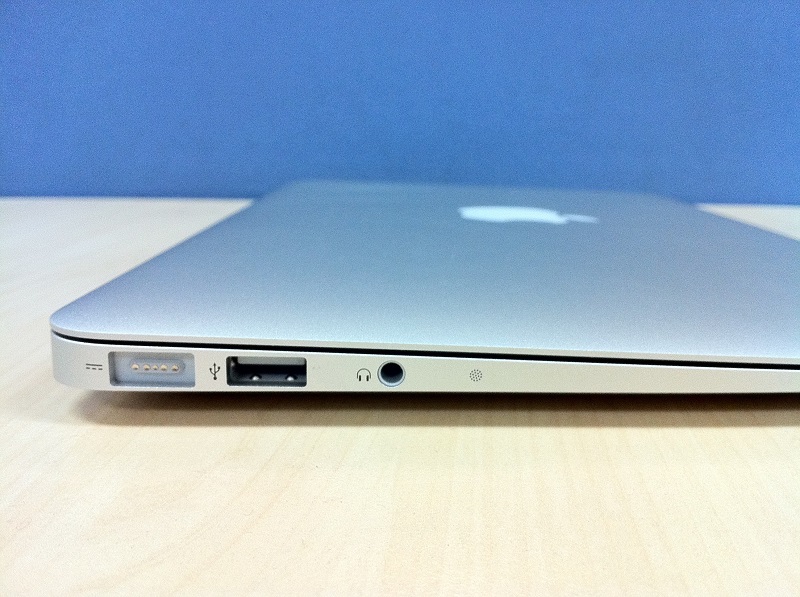
Self-contained, thin and light laptops that are easy to carry with you every day. Profile – up to 18 mm, weight – 1.2-1.4 kg. Typically aluminum case, fast SSD and quiet operation.
Designed for:
- office;
- education;
- trips.
They do not overheat, do not make noise, and hold a charge for 8-12 hours.
But there is a nuance - power. Enough for the browser, Zoom and document management. But for editing, games or 3D, this is not the right format (although there are exceptions with powerful filling).
Transformers (2-in-1)
Laptop and tablet in one case. The screen is touch-sensitive and can be rotated 360° or detached. You can work like a regular laptop, or you can hold it in your hands like a tablet.
Convenient for studying, taking notes, presentations, watching movies on the go. Many models support a stylus. Convenient for handwriting, taking notes in lectures, or drawing diagrams. Often these are models with 13-14″ displays, Full HD, weighing up to 1.5 kg and a charge for 8-10 hours.
Performance – average, i5 / Ryzen 5 + 8/16 GB. Ideal for browser, Zoom, notes and viewing. This is not the right format for heavy, resource-intensive tasks.
Subnotebooks (compact 11-13")
The smallest of the classic ones. Screen 11-13 inches, weight usually up to 1.2 kg. Fits in any backpack or bag, which is what you need for traveling, studying, or simple tasks on the road.
Basic filling:
- i3/Ryzen 3 or ARM processors
- 8-16 GB of memory.
For the browser, notes, mail, video calls - enough. But for editing or heavy programs it is not enough.
Holds a charge for 8-10 hours, does not heat up, does not make noise. This is when mobility is important, not power.
Desktop Replacement (PC replacements)
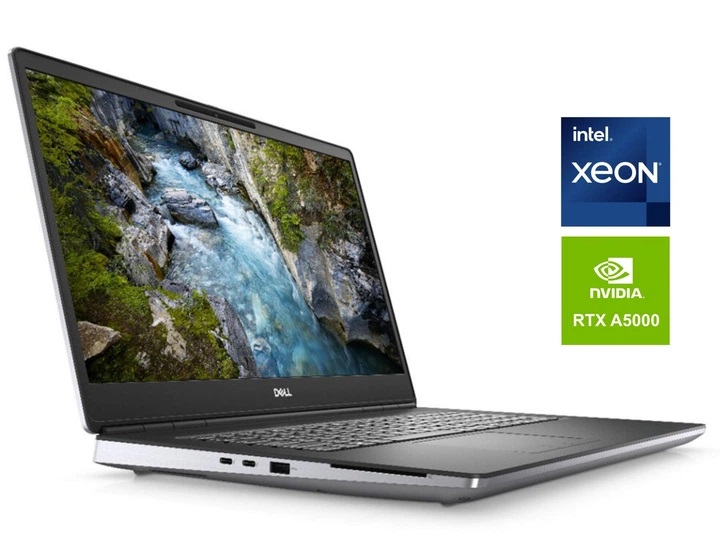
Large and powerful laptops that actually replace a desktop computer. A 16-17 inch screen gives you plenty of space for multiple windows, editing, tables or games, all on one screen.
They usually:
- powerful processors and video cards to handle heavy programs, rendering, 3D, editing;
- a large amount of RAM and storage so that files and projects do not drag down the system;
- good cooling, without it this filling heats up quickly.
But there is a logical drawback - poor mobility. Desktop replacements are usually heavy, large, and don't want to live without an outlet. This is not something you take to a cafe every day.
Mobile workstations
Everything here is done so that large projects do not throw errors, and programs do not crash in the most interesting place.
They differ in that they have certified graphics cards, for example, NVIDIA Quadro or professional RTX model laptops. It is these GPUs that pass tests and guarantee stable operation in CAD, 3D scenes, Maya, SolidWorks and similar programs.
These laptops usually have:
- powerful processor and plenty of memory for complex calculations;
- certified GPUs optimized specifically for professional editors;
- large and accurate screen for detailed work with models;
- robust build because they are usually used in daily work processes.
These are not “gaming monsters”, but machines for those who work on projects where reliability, accuracy and stability are important.
Now it is clear that a laptop is not only characteristics, but also form. So that everyone knows which one to choose and can take the one that suits both “inside” and “outside”.
How do these classes intersect?
Conventionally, we divided laptops by purpose and form, but in reality these categories overlap. For example:
- The ultrabook is quite suitable for both work and travel.
- A powerful 17-inch laptop can be used for gaming, or for editing or CAD.
- A business laptop is almost always a classic or ultrabook with increased security.
That is, these are not different types, but different ways of looking at the same thing. The same gadget can belong to several categories at once. The main thing is that it suits you.
Conclusion
We tried to analyze in detail all types of laptops, because there is no universal one. One is lightweight, another is powerful, the third is flexible, like a notepad, but each can have similar parameters. And in order not to overpay or be disappointed, you must first understand what you will do with it. And only then – choose the shape, filling and brand.